1.安装
npm i -g create-react-app
2.创建
create-react-app first-react-app
3.启动
cd first-react-app
npm start
4.文件结构
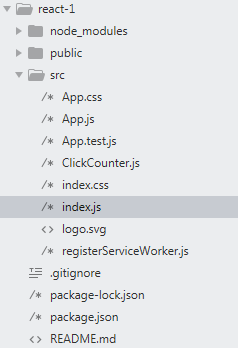
5..创建一个组件
/*src/ClickCounter.js*/
import React,{Component} from 'React';
class ClickCounter extends Component {
    construct(props){
        super(props);
        this.onClickButton = this.onClickButton.bind(this);
        this.state = {count:0};
    }
    onClickButton(){
        this.setState({count:this.state.count+1});
    }
    render(){
        return(
            <div>
                <button onClick={this.onClickButton}>Click Me</button>
                <div>
                Click Count:{this.state.count}
                </div>
            </div>
        );
    }
}
export default ClickCounter;
6.npm scripts
"scripts":{
    "start":"react-scripts start",
    "build":"react-scripts build",
    "test":"react-scripts test --env=jsdom",
    "eject":"react-scripts eject", //弹射:将react-scripts 中的一系列技术栈配置都“弹射”到应用顶层,以便更灵活的定制配置
}
注意:
- 在使用 jsx 的范围内,必须要有React. 尽管ClickCounter.js 组件中没有明确用到React ,但是还是要明确引入,否则会报错。
- jsx 中使用的“元素”不局限于HTML中的元素,可以是任何一个React 组件。
- React 判断一个元素时HTML还是React组件的原则就是看第一个字母是否是大写。
- jsx 中的 onClick 和HTML 属性的 onclick 的拼写区别需注意。