参考:
- MDN grid
- A Complete Guide to Grid
- grid by examples
Grid VS Flex
Flex : 主要用于一维布局
Grid :主要用于二维布局(row,column)
术语
Grid Container(栅格容器):display属性设为grid的元素,它是grid items(栅格元素/项目)的直接父元素。
Grid Item(栅格元素/项目):栅格容器的直接子元素(孙元素就不属于栅格元素了)。
Grid Line :构成网格结构的分界线,它们可以是水平或者垂直的,并且可以位于行或者列的任一侧。

Grid Track :两个相邻网格线之间的空间(类似于网格的行或者列)

Grid Cell :网格单元(两个相邻行和两个相邻列之间的空间)
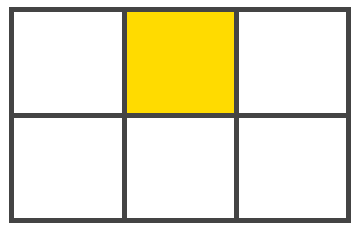
Grid Area :网格区域

| Properties for the Grid Container | Properties for the Grid Items | |||
|---|---|---|---|---|
| display:grid / inline-grid; | ||||
| grid-templage-columns:[line-name] <track-size> .../ [line-name] <track-size> | ||||
| grid-template-rows:[line-name] <track-size> .../ [line-name] <track-size> | ||||
| grid-template-areas:"<grid-area-name> / . / none / ..." "..." | ||||
| grid-template :none / <grid-template-row> / <grid-template-columns> | ||||
| grid-column-gap :<line-size> | ||||
| grid-row-gap:<line-size> | ||||
| grid-gap :<grid-row-gap> <grid-column-gap> | ||||
| justify-items : start \ | end \ | center \ | streach; | |
| align-items : start \ | end \ | center \ | streach; | |
| place-items : <align-items>/<justify-items>; | ||||
| justify-content : start / end / center / strech / space-around / space-between / space-evenly; | ||||
| align-content : start / end / center / strech / space-around / space-between / space-evenly; | ||||
| place-content : <align-content>/<justify-content> | ||||
| grid-auto-columns : <track-size> | ||||
| grid-auto-rows : <track-size> | ||||
| grid-auto-flow : row / column / dense | ||||
| grid : | ||||
注意
通过嵌套元素(也称为子网格)向下传递网格参数的能力已移至CSS网格规范的第2级
定义Grid Line的名称需要使用[name]语法,一条Grid Line 可以有多个名称,中间用空格分开
若定义colunms或rows时是重复内容,可以使用repeat()函数简化写法
fr 单位可以允许设置track-size为可用空间(free-space)的一部分